
How to Sync a Garage Door Opener With a Remote for Any Brand
Explore trusted repair services in your area, including Garage Door Repair in Vero Beach. Different opener brands use the same basic syncing method, even though their learn buttons may look different. Chamberlain, LiftMaster, and Craftsman units typically use a yellow, purple, red, or green learn button, while Genie uses square program buttons. Regardless of the brand, syncing begins by activating the opener’s pairing mode before pressing the button on your remote. Understanding this universal method makes it easy to sync remotes across different models. Once you locate the learn button, the opener instantly enters a short programming window that allows the remote to send its unique, secure code. After the system accepts the code, the remote pairs successfully and becomes ready for daily use..
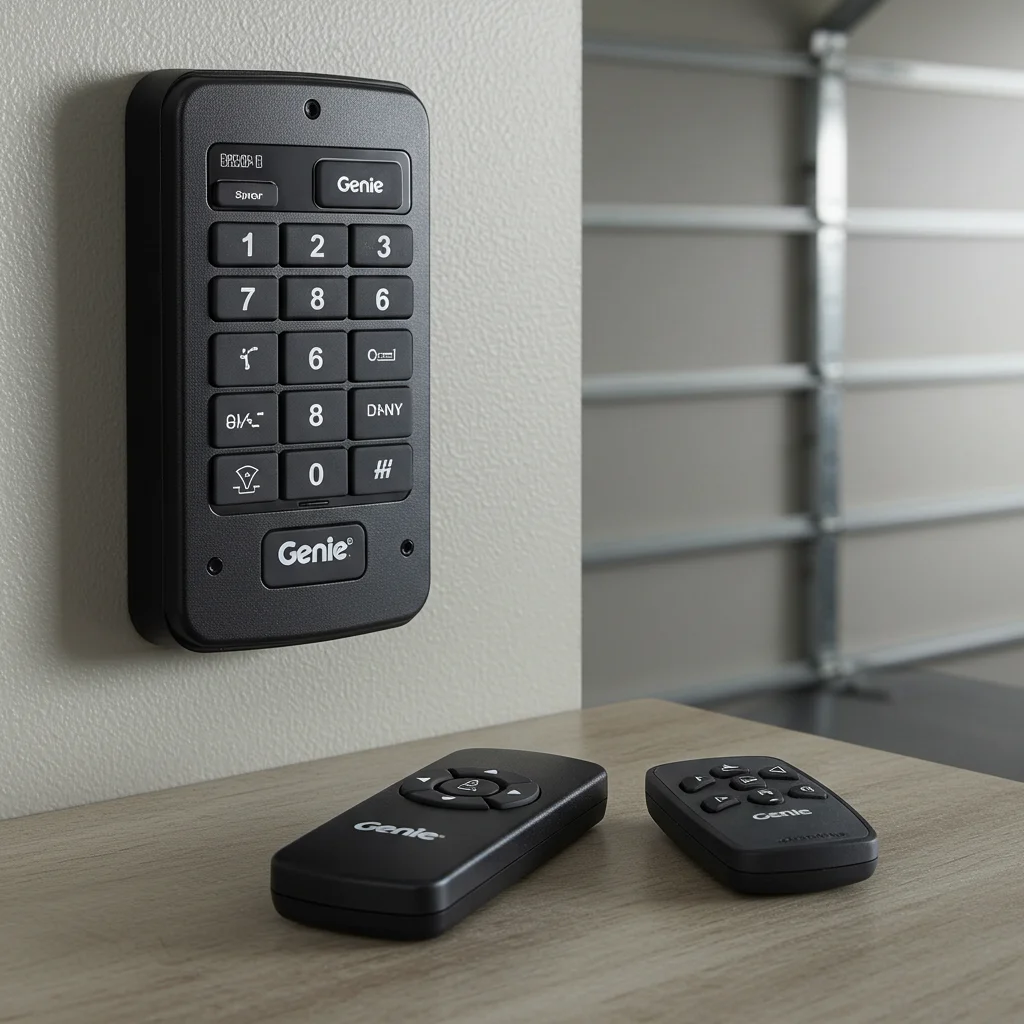
How to Sync a Garage Door Opener With a Remote Step-by-Step
If you ever need expert help, visit Garage Door Repair in Alva. Syncing follows a simple timing-based sequence. Pressing the learn button activates the opener’s programming mode, indicated by a flashing light or soft click from the motor head. Within this short window, pressing the remote button sends a signal to the opener, which completes the handshake between the two. Testing the remote afterward confirms successful pairing. If the door responds immediately and moves smoothly, the syncing process is complete. If the opener does not react, repeating the process slowly and deliberately usually solves the issue. Most syncing errors come from pressing the buttons too quickly or missing the timing window set by the motor..
Table of Contents
- How to Pair a Garage Door Opener
- Understanding How Pairing Works in Modern Garage Door Systems
- What You Need Before Pairing Your Garage Door Opener
- How to Pair a Garage Door Opener Remote
- How to Pair a Garage Door Opener Keypad
- How to Pair a Garage Door Opener to Your Car
- How to Pair Popular Garage Door Opener Brands
- Troubleshooting Problems When Pairing a Garage Door Opener
- When You Need to Re-Pair or Reset Your Garage Door Opener
How to Sync a Garage Door Opener With a Remote the Easy Way
Homeowners looking for dependable assistance can check Garage Door Repair in Bokeelia. The easiest way to sync an opener and remote is to stand close to the motor unit to ensure a strong signal. Opening the light cover gives you quick access to the learn button. Once pressed, holding the remote button for two to three seconds allows the opener to lock onto the signal. Performing the pairing process without distractions ensures smoother syncing. This is especially helpful for homeowners who are not familiar with garage door opener technology. By following a calm, step-by-step approach, you can sync a remote without needing professional assistance.
How to Sync a Garage Door Opener With a Remote and Improve Security
For additional service support, visit Garage Door Repair in Bonita Springs. Syncing a remote does more than restore convenience. It also increases the security of your garage by updating the opener’s access code. Modern remotes use rolling-code technology, which changes the security code every time the door is operated. Syncing a new remote ensures only authorized devices can activate your door. Whenever a remote is lost or stolen, syncing a new one and clearing the opener’s memory prevents unauthorized entry. This simple step enhances safety and protects your home by removing old, untrusted codes from the system forever.
How to Sync a Garage Door Opener With a Remote and Improve Security
For additional service support, visit Garage Door Repair in Bonita Springs. Syncing a remote does more than restore convenience. It also increases the security of your garage by updating the opener’s access code. Modern remotes use rolling-code technology, which changes the security code every time the door is operated. Syncing a new remote ensures only authorized devices can activate your door. Whenever a remote is lost or stolen, syncing a new one and clearing the opener’s memory prevents unauthorized entry. This simple step enhances safety and protects your home by removing old, untrusted codes from the system forever.
How to Sync a Garage Door Opener With a Remote After Resetting the System
To find professionals nearby, explore Garage Door Repair in Buckingham. After resetting your opener, all previous remotes and keypads are erased from the unit’s memory. This requires you to sync each device again. Resetting is useful when moving into a new home, replacing outdated remotes, or tightening security after a lost transmitter. Once the reset is complete, syncing each remote is done individually. Pressing the learn button opens a fresh programming cycle, allowing you to rebuild your device list one at a time. This gives you complete control over who can access your garage.
How to Sync a Garage Door Opener With a Remote on Older Garage Door Models
Older systems may require expert help such as Garage Door Repair in Burnt Store Marina. Older garage door openers often use DIP switches instead of learn buttons. These tiny switches align the remote and the opener using matching codes. To sync them, you slide the switches inside the remote so they mirror the pattern on the opener’s control board. Although the syncing method is more manual, it remains reliable. Ensuring each switch is firmly in place helps avoid misfires. Once aligned, the remote and opener communicate instantly and function as effectively as modern rolling-code systems..
How to Sync a Garage Door Opener With a Remote Without Technical Experience
Need easy help? Check Garage Door Repair in Cape Coral. Anyone can sync a remote without needing mechanical or electrical skills. The process requires only a ladder, your remote, and a few minutes of attention. Opening the light cover, pressing the learn button, and sending the remote’s signal can be done by any homeowner following simple instructions. This user-friendly design makes garage door openers easy to maintain. Manufacturers understand that remotes can be lost or replaced frequently, which is why the syncing process was designed to be accessible for everyone..
How to Sync a Garage Door Opener With a Remote and Fix Pairing Issues
Local support is available through Garage Door Repair in Captiva. If syncing fails, the issue is usually a weak remote battery, incorrect timing, or interference near the opener. Replacing the battery, stepping closer to the motor, or repeating the pairing sequence often resolves the problem. Ensuring the opener has steady power and the antenna wire is fully extended also improves reception. In some cases, the remote may be incompatible due to frequency differences. Checking the model number and matching the correct remote type ensures proper communication between devices. Fixing these small issues restores full function quickly..
How to Sync a Garage Door Opener With a Remote and Program Multiple Devices
For homeowners with multiple remotes, consider Garage Door Repair in Charleston Park. Most homeowners use more than one remote, and syncing multiple units follows the same programming method. Each remote requires its own pairing cycle, which allows the opener to register each unique rolling code. Once synced, the opener recognizes every remote independently. This multi-device compatibility is useful for families, rental properties, and garages with multiple access points. By syncing more than one remote, you increase convenience while maintaining security and reliable functionality..
How to Sync a Garage Door Opener With a Remote Like a Professional Technician
You can also count on experts such as Garage Door Repair in Cypress Lake. Professional technicians follow a clean, precise method when syncing remotes. They inspect the opener for power issues, confirm model compatibility, test the antenna, and verify that the garage door moves smoothly before pairing new devices. Following this mindset ensures you avoid common mistakes and achieve a perfect sync every time. Understanding the system, taking your time with each step, and verifying the final operation allow you to complete the process with technician-level confidence. This professional approach guarantees long-lasting, secure, and dependable performance from your garage door opener. .

How to sync a garage door opener with a remote?
How to Sync a Garage Door Opener With a Remote: Step-By-Step Homeowner Guide